


File Protection System
 GoSafe is an on the fly USB Dongle based encryption / decryption security product which allows you to encrypt your files and send it to your friend / customer / colleague via electronic transfer systems like email.The other person receiving the file will require a USB dongle from the same set to decrypt and use the file.
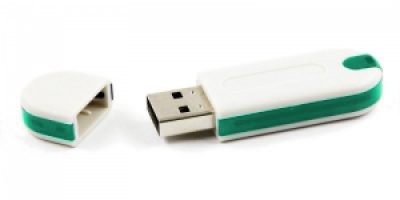
This provides you security for your data and private information when your data is in transit or in the email as attachment. Any person getting hold of your files will not be able to use them unless he/she has the USB dongle from the same set.
You can order GoSafe with required set of dongles. For example, if you have 500 offices you can order GoSafe with 500 Dongle set.
Available for Windows/Linux/Mac



Certification: 

GoSafe File Encryption
GoSafe is an on the fly USB Dongle based encryption / decryption security product which allows you to encrypt your files and helps you to protect your important data when you are transferring files online or as an attachment in an email. GoSafe is suitable for encryption of all file formats.
During file transfers in online chat programs like Skype, Yahoo Messenger, GTalk and others, it is possible for a hacker to hack your files. It is also not very difficult to hack your email account and download your important file attachments.
To protect your files, one of the best ways is to encrypt them.
Normal encryption and protection techniques use password or a text string to encrypt and protect file. This password is saved inside the file itself and hence it is very easy to crack such encryption and get hold of your data.
 GoSafe uses an USB Dongle to store the encryption key and also uses three other verification keys stored inside dongleplus a unique hardware serial number of the dongle. This makes it very safe and can even be used in military communication.
GoSafe dongles are made in set. The other person receiving the file will require a USB dongle from the same set to decrypt and use the file. Any person getting hold of your files will not be able to use them unless he/she has the USB dongle from the same set.
You can order GoSafe with required set of dongles. For example, if you have 500 offices you can order GoSafe with 500 Dongle set.
You can also expand the GoSafe dongle set. We will simply need two dongles from the existing set and KYC [Know Your Customer] form filled along with supportive documents and authorization.
How GoSafe File Encryption Works:
 GoSafe File Encryptions uses very strong encryption mechanism and verifying dongles credentials specific to the set of dongles also.
You can use GoSafe Key Customization Tool to customize encryption keys and make as many user groups as you want having common encryption key.
GoSafe File Encryption uses keys from shared key portion of the dongle.
See How GoSafe works in windows
| GoSafe SF File Encryption Decryption | GoSafe NF File Encryption Decryption |
Downloads
GoSafe NF:
The NF stands for New File. This version of GoSafe will create a new file when encrypting or decrypting.
GoSafe SF:
The SF stands for Same File. This version of GoSafe will encrypt or decrypt the same file when encrypting or decrypting.
Warning: You must have file backup because if something goes wrong it can corrupt your file and you will loose important data.
By downloading and using the software you agree to this license
 |
Custom Algorithm |
AESÂ Algorithm |
|||
| Â NF | SF | NF | SF | ||
| WINDOWS | |
.zip | .zip | .zip | .zip |
| LINUX 32bit | |
.rar .zip | .rar .zip | .rar .zip | .rar .zip |
| LINUX 64bit | |
.rar .zip | .rar .zip | .rar .zip | .rar .zip |
| MAC OS X | |
.rar .zip
(contains .dmg file) |
.rar .zip
(contains .dmg file) |
.rar .zip
(contains .dmg file) |
.rar .zip
(contains .dmg file) |
Price: Click For GoSafe Price
| Warranty | 1 year |
| Payment Terms | 100% advance |
| For Payment | Click here |
Note: Courier free for above 10Â pieces
Help Files:
|
 |
|
|
| Windows | Linux | Mac os X | |
| Installation | |||
| Operation |
| GoSafe Key Customization Tool |
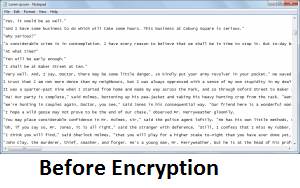
 How GoSafe Encrypts various file formats
Text files: .txt, .docx, .doc, .xps, .pdf, .rtf and others
| .txt file: | |
 |
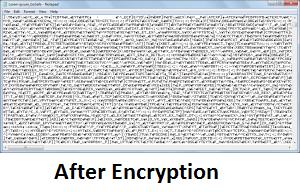 |
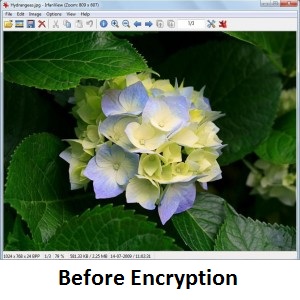
Image files: .jpg, .bmp, .gif, .ico, .png and others
| .Jpg file: | |
 |
 |
Support all other formats: .txt, .docx, .doc, .xps, .pdf, .rtf, .xlsm, .xlsm, .xls, .ppt, .pptx, .pptm, .jpg, .png, .bmp, .gif, .ico, .wma, .wmv, .mp3, .mp4, .rar, .zip, .bik, .bkf, .bz2, .egg, .egt, .ezip, .ess, .gho, .ghs, .gz, .ipg, .jar, .lbr, .lz, .lzh, .lzo, .mbw, .mpq, .bin, .nth, .arc, .par, .pk3, .pk4, .sen, .tar, .tgz, .tb, .tib, .uha, .iso, .img, .adf and all others.
How to Order
Contact us at support @ isohelpline.com.